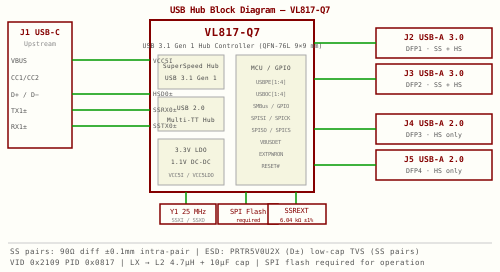
A four-port USB hub with one dedicated upstream port (to the host) and four downstream ports — two running USB 3.2 Gen 1 (SuperSpeed, 5 Gbps) and two running USB 2.0 (High-Speed, 480 Mbps). The controller IC is the VL817-Q7 (VIA Labs), a QFN-76L (9×9 mm) part used in many commercial hubs. All four downstream ports are SuperSpeed-capable at the IC level; ports 3 and 4 are simply wired as USB 2.0 connectors to save cost and board space.
Architecture- Upstream port (J1) — USB Type-C receptacle. One SuperSpeed lane pair (TX1±/RX1±) plus USB 2.0 D+/D-. CC1/CC2 pulled to GND via 5.1 kΩ to signal UFP (device) mode.
- Downstream SS ports (J2, J3) — USB Type-A 9-pin. Full SuperSpeed wiring: D+/D- plus TX± and RX± pairs.
- Downstream HS ports (J4, J5) — USB Type-A 4-pin. D+/D- only; VL817 SS pins for these ports left unconnected per datasheet.
- Clock — 25 MHz ±30 ppm crystal (Y1) at SSXI/SSXO pins. Short traces, C0G load caps.
- Power — VBUS → polyfuse → ferrite bead → VL817 VCC5I/VCC5LDO pins. VL817 has on-chip 5V→3.3V LDO and 5V→1.1V DC-DC switching regulator — no external LDO or DC-DC needed, but requires an external 4.7µH inductor on the LX pin. Per-port downstream VBUS switched by AP2141 power switches.
- ESD — PRTR5V0U2X dual-line TVS on each external port signal pair, placed at board edge before any other circuitry.
- The power strip at the top (F1 → L1 → VCC5I) is drawn for a standalone hub powered directly from the upstream USB connector's VBUS. If you are embedding this hub into a larger board (e.g. alongside an MCU, radio module, or other subsystems), the power design changes.
- VCC5I source — feed the hub's VCC5I/VCC5LDO pins from your project's main 5V rail instead of from J1 VBUS. Keep a dedicated ferrite bead on the VCC5I branch to isolate the hub's on-chip switching regulator noise from other circuits on the same 5V rail.
- Downstream port VBUS — the AP2141 switches (U11, U12) and the HS port polyfuses also need 5V. This can come from the same project 5V rail, but route it as a separate branch from VCC5I so high-current USB device loads don't cause voltage dips on the hub controller's supply.
- F1 polyfuse — in a standalone hub, F1 protects everything downstream of J1. In an integrated design, you likely already have overcurrent protection at your project's power input; F1 can be omitted or moved to protect only the USB downstream ports.
- J1 upstream connector — may become an internal header or direct PCB trace from your MCU's USB host port rather than an external USB-C receptacle. The CC pull-downs (R1, R2) are still required if the upstream connection is USB-C.
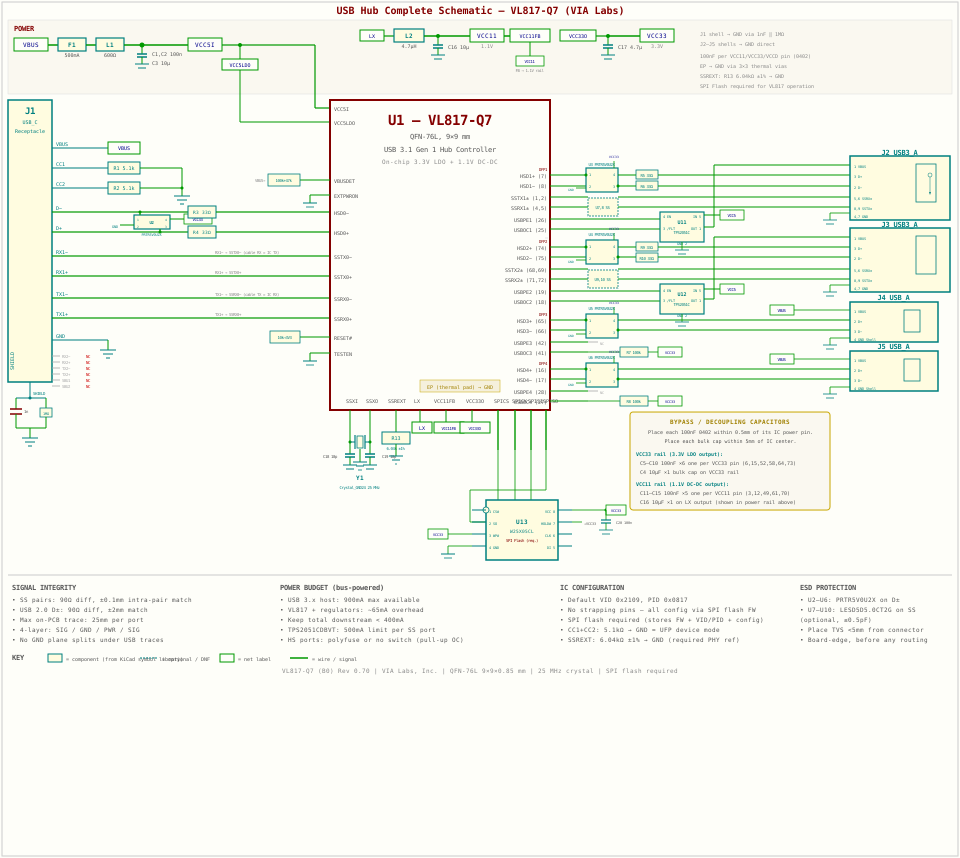
| Ref | Part / Value | Qty | Notes |
|---|---|---|---|
| U1 | VL817-Q7 — QFN-76L, 9×9 mm | 1 | 4-port hub controller (VIA Labs); stocked at JLCPCB, LCSC |
| J1 | USB Type-C receptacle, mid-mount or vertical | 1 | Upstream — to host; check USB 3.0 rated |
| J2, J3 | USB Type-A 3.0 receptacle, 9-pin, through-hole or SMD | 2 | Downstream SuperSpeed ports |
| J4, J5 | USB Type-A 2.0 receptacle, 4-pin | 2 | Downstream High-Speed only ports |
| U2–U6 | PRTR5V0U2X — SOT-363 | 5 | ESD TVS on D+/D−; one per port (4 down + 1 up) |
| U7–U10 | LESD5D5.0CT2G — SOT-363 (optional) | 4 | Low-cap (≤0.5 pF) TVS on SS pairs; 2 per SS port |
| U11, U12 | AP2141RNTR-G1 — SOT-23-5, or TPS2051C | 2 | Per-port VBUS power switch (SS ports J2, J3) |
| Y1 | 25 MHz, 12 pF, ±30 ppm, HC-49S or 3225 SMD | 1 | VL817 requires external 25 MHz crystal |
| F1 | 500 mA PPTC polyfuse, 1812 | 1 | Resettable; protects VBUS input |
| L1 | Ferrite bead 600 Ω @ 100 MHz, 500 mA, 0805 | 1 | EMI filter on VBUS; e.g. BLM21PG600SN1 |
| C1, C2 | 100 nF, 0402, X7R, 10 V | 2 | VCC5I input bypass (place within 0.5 mm of VCC5I pins) |
| C3, C4 | 10 µF, 0805, X5R, 10 V | 2 | VCC5I input bulk cap + VCC33 output bulk cap |
| C5–C10 | 100 nF, 0402, X7R, 10 V | 6 | One per VCC33 pin on VL817 (pins 6, 15, 52, 58, 64, 73) |
| C11–C15 | 100 nF, 0402, X7R, 10 V | 5 | One per VCC11 pin on VL817 (pins 3, 12, 49, 61, 70) |
| C16 | 10 µF, 0805, X5R, 10 V | 1 | VCC11 DC-DC output bulk cap (on LX output after L2) |
| C17 | 4.7 µF, 0805, X5R, 10 V | 1 | VCC33O LDO output cap (pin VCC33O) |
| L2 | 4.7 µH, 500 mA, 0805 power inductor | 1 | DC-DC switching regulator output inductor on LX pin |
| R13 | 6.04 kΩ ±1%, 0402 | 1 | External reference resistor on SSREXT pin (required) |
| C18, C19 | 18 pF, 0402, C0G/NP0, 50 V | 2 | Crystal SSXI/SSXO load caps — match to crystal spec |
| R1, R2 | 5.1 kΩ, 0402 | 2 | USB-C CC1 and CC2 pull-down (UFP device mode) |
| R3–R6, R9, R10 | 33 Ω, 0402 | 6 | Optional D+/D− series R: R3/R4 upstream, R5/R6 J2, R9/R10 J3 |
| R7, R8 | 100 kΩ, 0402 | 2 | USBOC pull-up on HS ports (no power switch) — pull to VCC33 |
| U13 | W25X05CL — SOIC-8 | 1 | SPI flash for firmware + custom VID/PID; required for operation |
| C20 | 100 nF, 0402, X7R, 10 V | 1 | SPI flash VCC bypass |
VL817 requires an external 4.7µH inductor on the LX pin for the DC-DC regulator and a 6.04kΩ ±1% resistor on SSREXT. SPI flash is required (not optional) — VL817 loads firmware from it at power-on.
- Target 90 Ω differential (≈ 45 Ω single-ended each trace). Use your PCB fabricator's controlled-impedance calculator with your copper weight and dielectric.
- Standard 4-layer with 0.1 mm traces on outer layers over a solid GND plane often gives 90–100 Ω differential on FR4.
- Intra-pair — the two traces within a differential pair (e.g. TX1+ and TX1−) must be matched to within ±0.1 mm. Compensate with small meanders on the shorter trace. Keep bends to 45° — never 90°.
- Inter-pair — between different pairs (e.g. TX vs RX for the same port) match to within ±5 mm. This is looser — the host controller tolerates inter-pair skew.
- Route each pair tightly coupled — trace separation ≤ 2× trace width (commonly 0.1 mm traces with 0.1 mm gap). This maintains the differential impedance and reduces EMI.
- Keep upstream SS traces under 25 mm on-PCB. Downstream ports under 25 mm each. The USB 3.2 Gen 1 loss budget is tight; long traces mandate lower-loss dielectric.
- Layer 1 (top) — signal: USB traces, components
- Layer 2 — solid GND plane, unbroken under all USB traces
- Layer 3 — power plane (3.3V, VBUS fills)
- Layer 4 (bottom) — signal: non-critical routing
- No splits under USB traces — any gap or cutout in the GND layer forces the return current to detour, radiating EMI and distorting impedance. Pour the GND plane solid; avoid routing slots under J1–J5 footprints.
- Via transitions — avoid layer-change vias on SS pairs where possible. If unavoidable, place GND stitching vias adjacent to each signal via (within 0.5 mm) so the return path stays local.
- Crystal guard ring — surround Y1, C18, C19, and the SSXI/SSXO traces with a GND guard ring connected to GND plane with multiple vias. Keep USB SS traces at least 3 mm away from this area.
- USB connector shell — connect J1 (USB-C) shield to GND through a parallel 1 nF cap + 1 MΩ resistor to board GND. This provides chassis-GND separation while still draining ESD. J2–J5 shells connect to GND directly.
- Place each PRTR5V0U2X within 5 mm of its connector, on the signal path before any other trace routing or vias. Board-edge placement is ideal — the TVS must see the ESD pulse before the IC does.
- Each VCC33 and VCC11 pin on VL817 gets its own 100 nF cap placed within 0.5 mm.
- Add a shared 10 µF bulk cap for each rail within 5 mm. Use X7R ceramic for 100 nF (stable over temperature), X5R for 10 µF.
- F1 and L1 go in series on VBUS before any branching. Place F1 near the upstream connector J1 to protect all downstream circuitry. L1 goes between F1 and the VCC5I input.
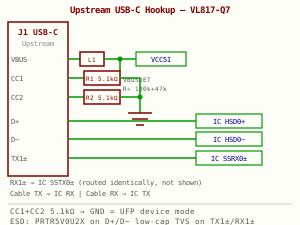
- Both CC1 and CC2 require individual 5.1 kΩ pull-down to GND. This identifies the hub as a USB-C UFP (peripheral/device). Without these, many hosts will not enumerate the hub.
- Do not share CC resistors — each pin needs its own. Total two resistors: R1 (CC1) and R2 (CC2).
- USB-C uses TX1±/RX1± for one cable orientation and TX2±/RX2± for the flipped orientation. The VL817 supports only one SS lane — check the datasheet for which side (TX1/RX1 or TX2/RX2) is connected. A CC-based orientation mux IC (e.g. TUSB321) can handle both orientations automatically.
- Cable label convention: TX and RX are from the host perspective. The hub's IC uses the opposite: cable TX1± connects to IC SSRX0± input, cable RX1± connects to IC SSTX0± output.
- L1 (600 Ω at 100 MHz, ≥ 500 mA) filters switching noise on the upstream VBUS rail before it reaches VL817's VCC5I input. Place L1 in series between J1 VBUS pin and the bulk cap.
- Route TX1± (cable) as a tightly coupled pair to IC SSRXP/SSRXN. Keep the two traces within 0.1 mm length of each other.
- Route RX1± (cable) to IC SSTXP/SSTXN similarly.
- Keep the TX pair and RX pair separated by at least 0.5 mm (3× trace width) to minimise cross-coupling.
- No 90° bends. Use 45° corners or arcs. Never let a high-speed trace run parallel to a neighbouring pair for more than 15 mm without a ground trace between them.
- Place a GND via beside each SS via if you must change layers.
- Route as a 90 Ω differential pair to VL817 HSD0+ and HSD0−. Length-match within 2 mm (less critical than SS, but still important above 100 MHz).
- If space allows, add optional 33 Ω series resistors R3/R4 between the TVS and IC — these damp reflections from impedance discontinuities at the connector.
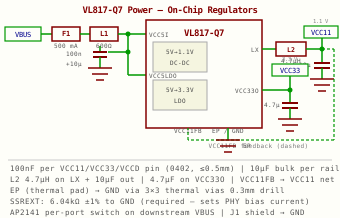
- F1 (500 mA polyfuse) — Resettable fuse in series with VBUS. Protects against shorts on the PCB or downstream ports. Reset by removing USB power.
- L1 (ferrite bead) — EMI filter. High-frequency noise on VBUS (from host charger switching) is attenuated before reaching VL817.
- VL817 on-chip regulators — The VL817 integrates a 5V→3.3V LDO and a 5V→1.1V DC-DC switching regulator. No external LDO is needed, but the DC-DC requires a 4.7µH external inductor on the LX pin and a 10µF output cap, plus a feedback resistor network. The LDO output (VCC33O) requires a 4.7µF cap. Supply clean 5V to VCC5I (DC-DC input) and VCC5LDO (LDO input).
- C1–C4 (bypass/bulk caps) — 100 nF + 10 µF on the VCC5I input. 100 nF + 10 µF on VCC33 output pins. 100 nF per VCC11 pin. Required for on-chip regulator stability.
- Each downstream SS port (J2, J3) should have an AP2141 or TPS2051C power switch IC on its VBUS line. These provide overcurrent protection per-port (≈ 500 mA limit), current limiting, and a fault flag the hub controller can read.
- USB 2.0 ports (J4, J5) can use the same switch or a simple polyfuse per port for a lower component-count build.
- USB upstream provides 500 mA (USB 2.0 host) or up to 900 mA (USB 3.x). With 4 downstream ports active at 100 mA each = 400 mA load plus hub overhead ≈ 50 mA. Total ≈ 450 mA. Keep total downstream allocation under 400 mA for bus-powered designs to leave headroom.
- The VL817-Q7 QFN-76L has multiple VCC33 and VCC11 pins distributed around the package. Place one 100 nF 0402 cap per power pin, within 0.5 mm of each pin.
- Use short, direct traces from pad to cap to GND. Avoid routing through a via if possible — via inductance degrades the bypass at high frequency.
- The VCC33 and VCC11 rails are generated on-chip — bypass caps connect from the IC output pins to GND, not from an external supply.
- Add one 10 µF 0805 bulk cap per rail (VCC5, VCC33, VCC11) within 5 mm of the IC centre.
- Place the 4.7µH DC-DC inductor (L2) close to the LX pin with a short, wide trace. The 10µF output cap connects between the inductor output and GND — keep this loop area small to minimise switching noise radiation.
- VL817-Q7 QFN-76L has a thermal exposed pad on the bottom. Connect this to the GND plane through a grid of thermal vias (e.g. 3×3 array, 0.3 mm drill). This is both an electrical GND connection and the primary heat path for the IC.
- The SSREXT pin requires an external precision resistor to GND: 6.04 kΩ ±1%. This sets an internal reference current for the USB PHY analog block. Do not omit or substitute with a standard ±5% value — use a 1% tolerance part.
- VL817 does not use strapping pins for configuration. All settings (port mode, power mode, VID/PID, charging behaviour) are stored in an external SPI flash and loaded at power-on. The SPI flash is required — without it the IC will not enumerate.
- Without a custom EEPROM image, the hub enumerates with VIA Labs' default VID 0x2109, PID 0x0817. Flash the IC using the VIA Labs hub configuration tool over USB, or with a CH341A programmer offline.
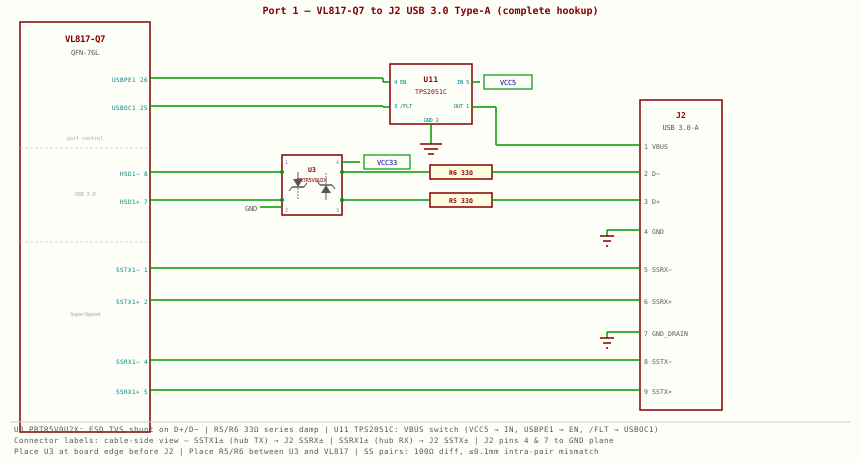
- VBUS — VCC5 → U11 TPS2051C (pin 5 IN) → U11 OUT (pin 1) → J2 pin 1. U11 EN (pin 4) driven by VL817 USBPE1 (pin 26); U11 /FLT (pin 3) feeds back to VL817 USBOC1 (pin 25).
- D− / D+ — VL817 HSD1− (pin 8) / HSD1+ (pin 7) → U3 PRTR5V0U2X (ESD TVS shunt on each line) → R6/R5 33 Ω series → J2 pins 2/3.
- SS TX (hub → device) — VL817 SSTX1− (pin 1) and SSTX1+ (pin 2) → J2 pins 5 (SSRX−) and 6 (SSRX+). Hub transmits; connector labels use the cable's receive direction.
- SS RX (device → hub) — J2 pins 8 (SSTX−) and 9 (SSTX+) → VL817 SSRX1− (pin 4) and SSRX1+ (pin 5). Cable transmits into the hub's receive input.
- GND — J2 pin 4 and pin 7 (GND_DRAIN) both connect to the GND plane. Keep stubs short; GND_DRAIN is the SS cable shield drain wire.
- Place U3 at the board edge, as close to J2 as possible, before any other circuitry on D+/D−. ESD clamps must intercept transients before they reach the IC.
- Place R5, R6 between U3 and VL817. Series damping resistors reduce reflections but must be after the ESD device to avoid degrading clamp effectiveness.
- U11 placement — near J2 VBUS pin. Keep the OUT trace short and wide (carries up to 500 mA). The EN and /FLT signals are low-frequency control lines — routing is not critical.
- SS pairs (SSTX1±, SSRX1±): route as 100 Ω differential pairs, ≤ 0.1 mm intra-pair length mismatch. Keep TX and RX pairs separated by at least 0.5 mm.
- Pin 1: VBUS (5V, switched by AP2141)
- Pin 2: D−
- Pin 3: D+
- Pin 4: GND
- Pin 5: SS_RX− (StdA_SSRX−, cable view)
- Pin 6: SS_RX+ (StdA_SSRX+)
- Pin 7: GND_DRAIN (separate SS shield drain)
- Pin 8: SS_TX− (StdA_SSTX−)
- Pin 9: SS_TX+ (StdA_SSTX+)
- Shell: Chassis GND — connect directly to board GND pour
- SS_RX± of connector → VL817 SSTXn+/SSTXn− (port n output). Again: connector-side RX is IC-side TX.
- SS_TX± of connector → VL817 SSRXn+/SSRXn− (port n input).
- D+/D− → VL817 HSDn+/HSDn−. Use 33 Ω series resistors (R5/R6 on J2, R9/R10 on J3) if trace is longer than 50 mm.
- GND_DRAIN (pin 7) connects to the GND plane — keep this stub short.
- PRTR5V0U2X on D+/D− pair. For SS pairs consider a LESD5D5.0CT2G or similar ≤ 0.5 pF TVS — standard PRTR5V0U2X capacitance may be too high for SS signals.
- Pin 1: VBUS (5V, polyfuse or AP2141)
- Pin 2: D−
- Pin 3: D+
- Pin 4: GND
- Shell: GND
- D+/D− go to VL817 HSD3+/HSD3− and HSD4+/HSD4− (ports 3 and 4). Route as 90 Ω differential pair.
- VL817 SS pins for ports 3 and 4 — leave SSRX3/SSTX3 and SSRX4/SSTX4 unconnected per the datasheet. These ports are SS-capable at the IC but only wired as USB 2.0 connectors in this design.
- To allow phone/tablet fast charging on USB 2.0 ports, add a BC1.2 charging port controller (e.g. TPS2514) per port. This shorts D+/D− to a specific voltage combination that tells the device to draw more than 500 mA.
- Alternatively, wire D+ to D− through 200 Ω — a simple Apple divider that allows up to 1 A on dumb chargers. Not spec-compliant but widely compatible.
- PRTR5V0U2X (SOT-363, dual-line TVS) handles D+/D− on each port. Place near connector, before series resistors.
- Choose a 4-layer stackup. Specify controlled impedance: 90 Ω differential on outer layers. Most fabs (JLCPCB, PCBWay) accept an impedance note in your gerbers. Standard thickness: 1.6 mm, 1 oz copper.
- Export gerbers. Include paste stencil for QFN reflow. VL817 QFN-76L thermal pad requires stencil apertures — use 0.8× coverage to avoid solder bridging under the IC.
- Reflow U1 (VL817) first. QFN-76L requires paste on the thermal pad and reflow oven or hot-air. Inspect for bridges with a loupe — 76 pins at 0.4 mm pitch are dense. Use flux pen and solder wick to clear any bridged pins.
- Solder passive components (caps, resistors, ferrite, polyfuse) by reflow or tweezers and hot-air.
- Solder U2–U12 (TVS, power switches) — SOT-23 and SOT-363 packages, use flux.
- Solder Y1 (crystal) last of the SMD parts — it's ESD-sensitive.
- Solder connectors J1–J5 — through-hole or SMD. Check that connector shells are firmly soldered to ground pads.
- Power-on check. Without connecting USB, apply 5V to J1 VBUS via a bench supply set to 500 mA current limit. Measure 3.3V on a VCC33 pin and 1.1V on a VCC11 pin — both are generated on-chip from the 5V input. If current spikes and voltage is low, check for shorts under U1 or a bad solder joint on the LX inductor.
- Oscilloscope check on crystal. Probe SSXI pin — should see 25 MHz sinusoid within ~50 ms of power-on. No oscillation usually means a cold solder joint on Y1 or wrong load caps.
- Plug into a USB 3.0 host port. The hub should enumerate in under 1 second. Check Device Manager (Windows) or
lsusb -t(Linux) — you should see VL817 (VID 0x2109) at USB 3.0 (5 Gbps). - Test each port. Connect a USB 3.0 flash drive to J2 and J3; run a speed test (CrystalDiskMark or
dd). Expect 300–400 MB/s sequential for a good SS drive. Connect USB 2.0 devices to J4 and J5. - ESD test (optional). Discharge a 100 pF cap charged to 1 kV against the connector shell while a device is enumerated — the hub should survive and re-enumerate.
- A length mismatch of 0.5 mm on a SS pair at 5 Gbps is already at the limit of the spec. Auto-routers almost never produce matched-length differential pairs. Always manually tune intra-pair lengths. Use your EDA tool's interactive length-matching tuning (serpentine meanders) on the shorter trace.
- Verify with the EDA DRC length-match rule: set tolerance to 0.1 mm for SS pairs, 2 mm for USB 2.0 pairs.
- Forgetting R1 or R2 (CC pull-downs) is one of the most common USB-C mistakes. Without them, USB-C PD hosts may refuse to provide power or may not negotiate an SS connection.
- If the VL817 fails to enumerate, check the crystal oscillator first — no clock means no USB. Common causes: wrong load capacitance, long traces on SSXI/SSXO, or a nearby noisy net coupling into the crystal.
- Use a multimeter in continuity mode to verify the QFN exposed pad is connected to GND through the thermal vias. A floating EP can cause erratic enumeration even if the IC appears to power up.
- If your fab cannot guarantee controlled impedance, use an online impedance calculator (e.g. Saturn PCB Toolkit) with your stackup parameters to target 0.1 mm traces on a standard 4-layer PCB. Typical result: 90–105 Ω differential — acceptable margin for a short-trace hub board.
- If you place a slot or keep-out under a USB connector footprint (e.g. for through-hole mounting), that interrupts the return path. Use SMD connectors where possible, or ensure through-hole solder pads do not break the GND plane layer.
VL817 has no hardware strapping pins for configuration. All hub settings are stored in the external SPI flash and loaded by the VL817 firmware at every power-on. The SPI flash is not optional — the IC will not enumerate without it. Use the VIA Labs hub configuration tool (Windows) to write settings over USB, or a CH341A/Flashrom-compatible programmer for offline programming.
Key Configurable Options (via firmware)- Port count — VL817-Q7 supports 4 downstream ports. All 4 are SS-capable at the IC level; whether a port runs SS or HS depends on connector wiring and firmware port configuration.
- Power mode — Ganged (one switch for all ports) or Individual (per-port AP2141). Configure via firmware for individual power mode so the hub can cut VBUS to a faulted port independently.
- USB charging mode — VL817 natively supports BC1.2 SDP/CDP/DCP and vendor-specific modes (Apple 2.4A, Samsung, etc.) — configure which ports advertise charging capability.
- Self-powered vs bus-powered — Set in firmware. This design is bus-powered.
- VID/PID and strings — Manufacturer name, product name, serial number all stored in SPI flash image.
VL817 firmware images are provided by VIA Labs. Do not hand-edit the binary. Use only the official VIA Labs configuration tool or a pre-built image. Datasheet revision: VL817 (B0), Rev 0.70.
- VL817 exposes USBPEn (n=1–4) — active-high power enable outputs. Connect each to the EN input of the corresponding AP2141 power switch. High = port VBUS enabled.
- VL817 exposes USBOCn (n=1–4) — active-low overcurrent sense inputs. Connect each to the /FLAG output of the AP2141. Hub will disable the faulted port and report it to the host. Low = overcurrent event.
- Pull USBOCn pins to VCC33 via 100 kΩ if the port has no power switch (HS ports using polyfuse only). This tells the IC the port is always healthy.
- VBUSDET — connect to upstream VBUS rail (after F1, 3.3V max). Hub uses this to detect host plug/unplug independently of the USB data lines.
- EXTPWRON — external power status input (3.3V max). Pull high if the hub is self-powered from an external supply; pull low (or leave low) for bus-powered designs.
- VL817 supports SMBus management from a host MCU via GPIO1/SMDAT and GPIO2/SMCLK pins (open-drain). This allows runtime control from an external microcontroller (e.g. RP2040).
- SMBus address: configurable via firmware image.
- Enable or disable individual downstream ports at runtime.
- Read per-port overcurrent status.
- Read USB link speed negotiated on each port.
- Trigger a hub reset without cycling VBUS.
- Leave SMBus pins unconnected or pull both high via 4.7 kΩ to VCC33.
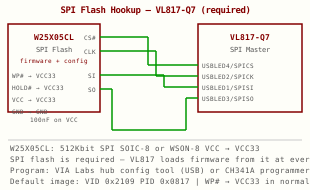
- VL817 loads its firmware from the SPI flash at every power-on. This flash is not optional — without it the IC will not enumerate. It also stores VID/PID, product strings, and hub configuration.
- Without a custom image, the hub enumerates with VIA Labs' default VID 0x2109, PID 0x0817, and a generic product string. This is fine for prototypes.
- A small SPI flash (e.g. W25X05CL, 512 Kbit, SOIC-8 or WSON-8) lets you store a custom VID/PID, manufacturer string, product string, serial number, and hub configuration. The VL817 reads it on every power-on.
- CS# (chip select) — connect to VL817 USBLED4/SPICS pin.
- CLK, MOSI (SI), MISO (SO) — connect to VL817 USBLED2/SPICK, USBLED1/SPISI, USBLED3/SPISO pins respectively.
- WP# — pull to VCC_3V3 during normal operation (write-protect enabled). Pull to GND during programming only.
- HOLD# — pull to VCC_3V3 (not used in this design).
- VCC — connect to VCC33 rail. Bypass with 100 nF cap within 2 mm.
- The SPI flash contains a binary image with VID, PID, device release number, manufacturer string (UTF-16LE), product string, serial number, and hub configuration bytes.
- The exact memory map is defined by VIA Labs and documented in their programming tool. Do not hand-edit the binary unless you have the full specification.
- Via VL817: Power the hub, connect to a Windows host, run the VIA Labs hub configuration tool. The tool programs the SPI flash over USB through the hub IC itself.
- Offline via SPI programmer: Use a CH341A or Flashrom-compatible programmer. Connect directly to the SPI flash pads (CS#, CLK, MOSI, MISO). Write the pre-built binary image.
- Via host MCU: If an MCU (e.g. RP2040) shares the SPI bus, it can program the flash at first boot from a firmware-embedded binary.
- You must license a VID from USB-IF ($6,000/yr) for commercial products or buy a PID under an existing VID (e.g. via OpenMoko, £10–15 one-time). Using someone else's VID is not legal for shipping products.
- For prototypes and internal use, the default VIA Labs VID 0x2109 is fine.
Uses IPC-2141A edge-coupled microstrip approximation. ±10% typical accuracy — verify with your fab's tool.
Common JLCPCB 4-layer JLC7628: H≈0.21mm, Er≈4.6. For 90Ω diff on outer layer: try W=0.1mm, S=0.1mm — confirm with their impedance table.
Finds C_load cap values for the SSXI/SSXO circuit. C_L is the crystal's specified load capacitance.
Formula: C_ext = 2 × (C_L − C_stray). Choose the nearest E12 value. For VL817 with a 25 MHz 12 pF crystal and ~3 pF stray per pin, 18 pF C0G caps are standard.